For builders
One plan. One scope.
Every sparky prices the same job.
Mark up the electrical on your own floor plan, send an unpriced tender PDF to your electricians, and compare their prices against the same scope. Then hand the plan to the one you pick — they get a free copy to quote from.
Best on a desktop or iPad. Founding price — locked in for as long as you stay. New-signup pricing rises in 2027.
One plan
Mark up the electrical yourself. On your own PDF.
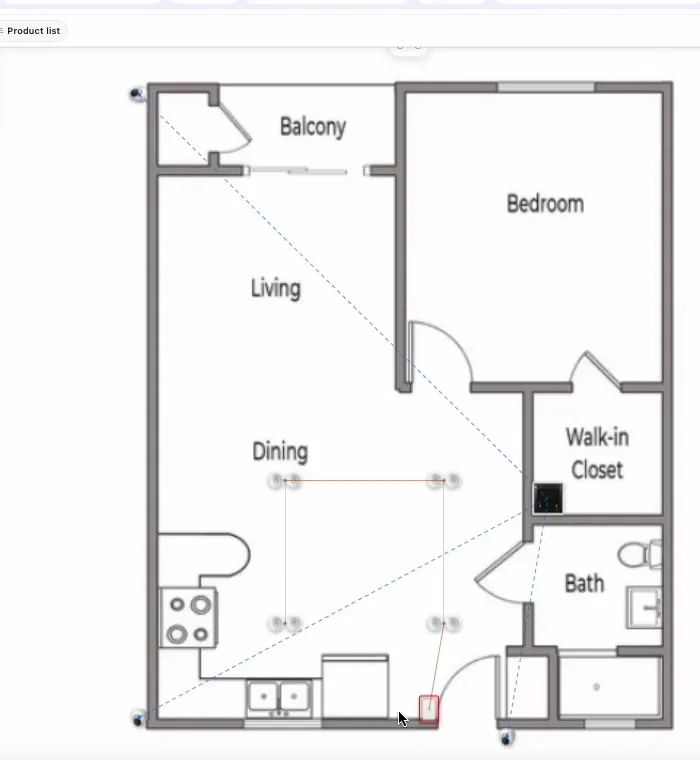
Upload the floor plan and tap to place downlights, switches, powerpoints, data, the board and the appliance circuits — with standard symbols and a legend any electrician reads at a glance. Multi-floor. Change it when the client changes their mind.
It’s the plan you were going to scribble on anyway — except this one adds up the product list and never loses the pencil marks. Best on a desktop or iPad.
One scope
Every electrician prices exactly the same job.
Generate the unpriced tender PDF — the plan, the product list and the switch schedule, with no dollar figures on it. Send it to as many electricians as you like. No more comparing a quote for 42 downlights with one for 38.
On the tender comparison page you record each electrician’s price against the same scope, side by side, and pick.
One handover
Send it to your electrician. They get their own copy, free.
Tap Send to electrician. Your sparky signs up free, gets their own copy of the plan, and prices it at their rates — straight into a quote, from the same points you placed. The Free tier includes one plan, so it costs them nothing to quote your job.
When the client wants two more powerpoints in the kitchen, you move them on the plan. Your electrician’s quote shows a plan-changed badge and refreshes in one tap.
The plan itself
The same markup your electrician uses.
robot Plan is the plan software electricians use to quote new builds. You’re drawing in the same tool they price from — so nothing gets lost between your scope and their quote.
What’s included
What a builder gets, by name.
- Upload your PDF
- The architect’s plan, as it arrived.
- Tap to place
- Lights, switches, powerpoints, data, board, appliances.
- Multi-floor
- Tabs across the top.
- Symbols + legend
- Standard, readable, printable.
- Product list
- Every item counted, per floor and in total.
- Switchboard schedule
- Appliance circuits land on the board.
- Tender PDF
- Unpriced. The scope, nothing else.
- Tender comparison
- Each electrician’s price against the same scope.
- Send to electrician
- They sign up free and get their own copy.
- Live client link
- The client taps through the plan on their phone.
- Lock + offline HTML
- Freeze the agreed plan; open it with no signal.
- Plan-changed badge
- Your electrician’s quote refreshes in one tap.
Plan with the brands your electricians install








“robot Plan gives us the tools to edit the electrical plans ourselves, saving us a lot of time and money.”
Builder questions.
I’m not an electrician. Can I really draw the electrical plan?
You can place the points — where the client wants lights, switches and powerpoints — the same as you’d mark on paper. Your electrician still does the design judgement, the circuits and the compliance. What robot gives you is a clean scope every sparky reads the same way.
What does the tender PDF show?
The marked-up plan with symbols and legend, the product list and the switch schedule — with no prices. It’s the same document for every electrician you send it to.
What does my electrician have to pay?
Nothing to quote your job. When you send them the plan they sign up free and get their own copy on the Free tier, which includes one plan. If they want to use robot for the rest of their business, that’s up to them.
Can the client see the plan?
Yes. Send them a live link: they switch floors, tap any point to see what it is and turn layers on and off. It’s the clearest conversation you’ll have about where the lights go.
What does it cost me?
robot Plan is $89/month inc GST, or $69/month billed yearly, with 30 days free and unlimited users. Founding price — locked in for as long as you stay. New-signup pricing rises in 2027.
Book a call
Got a job going to tender?
Book 15 minutes with the robot team. Send us the floor plan beforehand and we’ll mark it up and generate the tender PDF together on the call.
- 15 minutes, on the phone
- Mornings before work or after 3pm
- Bring a real job — we’ll run it through robot together
Pick a day
Pick a time
Checking Jacob’s calendar…
15 minutes · Jacob calls you · times shown in Sydney time